
COHO Frontdesk2026-07-07T18:10:21+00:00

Your room enquiries answered by real people, same hour, every time. 

COHO Frontdesk runs your room enquiry inbox for you, so you can turn more qualified enquiries into booked viewings.

Now in trial for selected customers

Real people

A real person reads and replies to every enquiry that comes in, using messages you have approved. Nothing automated, nothing off-script.

Listings kept seen

Adverts refreshed every hour and photos rotated, so your rooms stay near the top of search where tenants are looking.

Qualified leads

Not just names. Applicants are pre-qualified before they reach your COHO viewing panel, so you're booking viewings with people who fit.

Every lead, in your COHO panel
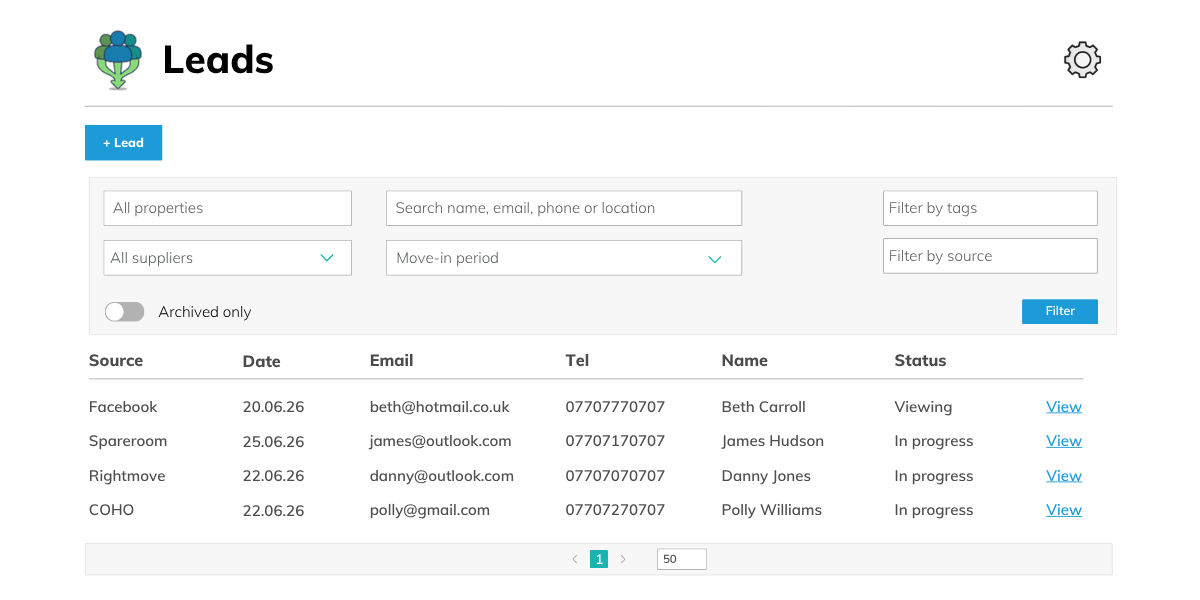
Keeping your listings seen and enquires answered

Replies within 30 minutes

Every message gets a reply using your approved templates. Nothing goes unanswered.

Listings refreshed hourly

Live listings refreshed once an hour to stay near the top of search.

Photos rotated regularly

The first few photos are shuffled every couple of days to keep listings feeling fresh.

Proactive outreach

Anyone who shows interest but doesn't message gets contacted directly.

Questions logged to COHO

Every applicant query is copied into your COHO notes, so you have full context before the viewing.

Listings kept in sync

When you update a property in COHO, the listing is updated to match.

From enquiry, to booked viewing

1

An enquiry arrives

A prospective tenant sends a message or shows interest in one of your rooms.

2

We reply within 30 minutes

Our team responds using the templates you've approved, so every reply is warm and consistent across your rooms.

3

Contact details collected

We ask for the applicant's name, email and phone number. Once we have them, they're added to COHO as a viewing lead straight away.

4

Questions logged to COHO

Anything the applicant asks is copied into the COHO notes for that viewing, so you have full context before you speak to them.

5

You take it from here

You pick up the lead in COHO and arrange the viewing. No inbox-checking required on your end.

FAQs

Does Frontdesk do the letting for me?2026-06-26T12:06:24+00:00

No. We answer, chase and qualify enquiries, then hand you warm leads. You run the viewings and complete the let.

What does it cost?2026-07-01T18:03:29+00:00

We’re currently running this service as a trial for some customers. Enquire to find out more.

How do I know leads are being captured?2026-07-01T17:55:55+00:00

Check your COHO leads pipeline, every applicant who provides contact details will appear there. If you’re ever unsure whether a specific lead was logged, check COHO first. You can also contact us if something doesn’t look right.

What happens after a lead is captured?2026-07-01T17:55:15+00:00

Once an applicant provides their name, email, and phone number, they are added to your COHO account as a  lead straight away. You’ll see them in your Viewings and leads pipelines. From there, it’s over to you to arrange the viewing.

Can I customise the messages?2026-07-01T17:54:39+00:00

No. The message templates are standardised. This is intentional, it means every applicant gets the same quality of response, regardless of which account or team member is handling it, and it removes the risk of errors or inconsistency.

The one thing that is personalised per account is the initial message sent via COHO when a lead is added, this uses the message you provided at onboarding.

What do the messages look like?2026-07-01T17:53:42+00:00

All messages are warm, professional, and consistent. They ask the applicant for their name, email address, and phone number so we can add them to your COHO pipeline. You agreed the exact wording at onboarding.

Can I still reply to messages myself?2026-07-01T17:58:55+00:00

Once your account is live, please do not respond to messages directly. If both you and our team reply to the same thread, the applicant receives duplicate or conflicting messages.

Any applicant query that needs your input will be passed to you via COHO. If something feels urgent, contact us directly.

How quickly are enquiries responded to?2026-07-01T17:52:53+00:00

Within 30 minutes during service hours. Our team checks inboxes every 30 minutes and responds as soon as a new message comes in.

Can I opt out of certain parts of the service?2026-07-01T18:00:56+00:00

Yes, for two elements: photo rotation and listing updates. If you’d like to opt out of either, let us know and we’ll update your account. Core inbox management (responding to enquiries, logging leads to COHO) is standard across all accounts and cannot be opted out of individually.

How do I let you know a property is unavailable?2026-07-01T17:57:25+00:00

Update COHO. As soon as COHO marks a property as unavailable, we will deactivate the corresponding listing. You don’t need to contact us separately, COHO is the trigger.

Please do not deactivate the listing directly, as this can cause inconsistencies between the two systems.

How will I know it’s working?2026-06-26T12:17:22+00:00

Qualified leads appear in your COHO viewing panel as they come in, so you have full visibility without digging through the inbox yourself.

Can it cover more than one property?2026-06-26T12:11:17+00:00

Yes. Frontdesk is charged per unit, so it scales across your whole portfolio rather than a single property.

When is it covered?2026-06-26T12:09:09+00:00

Every day, from 1pm to 9pm. That covers the hours when most room enquiries come in.

Is this just an auto-responder?2026-06-26T12:02:01+00:00

No. A real person reads and replies to every enquiry. Nothing is automated, and nothing goes out off-script.

What do I need to do to set it up?2026-06-26T12:15:44+00:00

Very little. You fill out this form, we’ll get in touch, you approve your templates, and the team takes it from there.